

Gate an API behind payments
HTTP 402 payment gating lets an API charge per request, with no accounts and no API keys, which fits when each request should be paid. In this guide you build an Express API with one free route and one priced route, then a client that pays the price from BSV Desktop and gets the content. The server and the client are separate Node projects.
Before you begin
You need Node.js 22 or newer, and a testnet wallet in BSV Desktop with some test coins for the client. Send a payment from a web app shows how to set one up.
How it works
The @bsv/402-pay package implements both sides of the exchange that BRC-121 defines. Two programs and a wallet take part:
- The server is an Express API. A middleware,
createPaymentMiddleware, prices a route, and the server has its own wallet on a local SQLite file that receives the payments. - The client is a Node script.
create402Fetchwrapsfetch, asks BSV Desktop to sign the payment, and repeats the request.
- ClientAsk
The client asks the server for the paid page.
- ServerPrice
The server answers 402: it costs 1000 satoshis.
- BSV DesktopPay
The wallet pays. You click Authorize.
- Client and serverGet
The client asks again with the payment. The server lets it in.
The client pays from the wallet to an address derived from the server key, and sends the payment in five x-bsv-* headers.
Set up the gated API
Build a server that charges for one route and a client that pays for it, each in its own new folder.
Charge for a route
Follow these steps in an empty folder for the server to charge 1,000 satoshis (1 BSV is 100,000,000 satoshis) for one route of an Express API and leave another route free:
Install the packages
Use npm in the server folder to install the packages:
npm install express @bsv/sdk @bsv/402-pay @bsv/wallet-toolbox
npm install -D tsx @types/express @types/nodeexpress serves the API, @bsv/402-pay provides the middleware, @bsv/wallet-toolbox builds the server wallet and @bsv/sdk generates the key in the next step.
Create the server key
In the same folder, generate the key. It is the identity of the server wallet, and the payments belong to it. Generate it once:
node -p "require('@bsv/sdk').PrivateKey.fromRandom().toHex()"Save the output in a .env file in the server folder as SERVER_PRIVATE_KEY=YOUR_SERVER_KEY, replacing YOUR_SERVER_KEY with the output.
The server key controls the server wallet and everything it receives. Keep it private, never share it and never paste it into code. Add .env to your .gitignore before you commit anything.
Create the server wallet and gate the route
Create server.ts in the server folder:
import express from 'express'
import { Setup, type SetupEnv } from '@bsv/wallet-toolbox'
import { createPaymentMiddleware, type PaymentResult } from '@bsv/402-pay/server'

declare module 'express-serve-static-core' {
  interface Request {
    payment?: PaymentResult
  }
}

const env = { chain: 'test' } as SetupEnv

async function main() {
  const { wallet } = await Setup.createWalletSQLite({
    env,
    rootKeyHex: process.env.SERVER_PRIVATE_KEY!,
    filePath: './server-wallet.sqlite',
    databaseName: 'gate-api'
  })

  const app = express()

  app.get('/api/free', (req, res) => {
    res.json({ message: 'Free content' })
  })

  app.get('/api/premium', createPaymentMiddleware({ wallet, calculatePrice: () => 1000 }), (req, res) => {
    res.json({
      message: 'Premium content',
      satoshisPaid: req.payment?.satoshisPaid,
      paidBy: req.payment?.senderIdentityKey,
      txid: req.payment?.txid
    })
  })

  app.listen(3000, () => console.log('Server on http://localhost:3000'))
}

main().catch(console.error)The declare module block tells TypeScript that req.payment exists, the object the middleware fills with the payment details. Setup reads only chain from env when you pass rootKeyHex, so env sets the testnet and as SetupEnv lets TypeScript accept it with only that field. process.env.SERVER_PRIVATE_KEY is the key you saved in .env, and the ! tells TypeScript it is set.
Setup.createWalletSQLite builds the server wallet on a local SQLite file, so no remote storage server is involved, and the wallet keeps what it receives in server-wallet.sqlite. calculatePrice returns the price in satoshis, and a price of 0 or undefined lets the request through.
Put the middleware on the route instead of pricing request paths in one global function. Express serves /api/premium/ and /API/premium from the same route, and a price table keyed by req.path does not match them, so they would be served without payment.
Start the server
Start it from the server folder:
npx tsx --env-file=.env server.tsThe terminal prints the line below and stays busy, so the next step uses a second terminal.
Server on http://localhost:3000Request the priced route
Open a second terminal and request the route without paying:
curl -i http://localhost:3000/api/premiumThe 402 comes from the middleware of your server, with an empty body and two headers that the client needs. The usual Express headers are left out here:
HTTP/1.1 402 Payment Required
x-bsv-sats: 1000
x-bsv-server: <identity key of the server wallet>
Content-Length: 0Pay for a route
With the server answering 402, create a second folder for the client, with a wallet that signs the payment and a fetch that pays and repeats the request:
Install the packages in the client folder
Add the client packages from the client folder:
npm install @bsv/sdk @bsv/402-pay
npm install -D tsx @types/node@bsv/402-pay provides create402Fetch for the client, and @bsv/sdk provides WalletClient, which connects to BSV Desktop. The client does not need the server packages.
Create the paying fetch and request the route
Create client.ts in the client folder:
import { WalletClient } from '@bsv/sdk'
import { create402Fetch } from '@bsv/402-pay/client'

async function main() {
  const fetch402 = create402Fetch({ wallet: new WalletClient('auto', 'localhost:3000') })

  const response = await fetch402('http://localhost:3000/api/premium')
  console.log(response.status, await response.json())
}

main().catch(console.error)The second argument of WalletClient is the originator, the name BSV Desktop shows for your app. A Node script cannot reach the wallet without one.
Run the client and authorize the payment
In the client folder, with the server still running, run it:
npx tsx client.tsBSV Desktop opens a Spending Request for localhost, labeled BRC-121 web payment, with the price plus a network fee that depends on the size of the transaction, for example 1,057 satoshis for a price of 1,000. Click Authorize. A payment cannot be undone once it is broadcast, on testnet or on Mainnet. The client then prints the status and the premium content, with the amount, the identity key of the client and the transaction ID of the payment:
200 {
  message: 'Premium content',
  satoshisPaid: 1000,
  paidBy: '<identity key of the client wallet>',
  txid: '<transaction id of the payment>'
}Cache paid responses
The client does not cache by default. Set cacheTimeoutMs on create402Fetch to reuse a paid GET response for that long, and call fetch402.clearCache() to force a new payment.
const fetch402 = create402Fetch({
  wallet: new WalletClient('auto', 'localhost:3000'),
  cacheTimeoutMs: 30 * 60 * 1000
})Customize and deploy
Once the basic flow works, adapt how the client pays and prepare the server for real traffic.
Pay without confirming each request
To let a script or a server pay with nobody at the screen to click Authorize, turn off the spending permission of BSV Desktop.
With this permission off, any process on the machine that reaches the local API of BSV Desktop can spend from the wallet without asking, because that API has no authentication. Use a wallet only for this purpose, with little funds.
Follow these steps in BSV Desktop:
Open the advanced settings
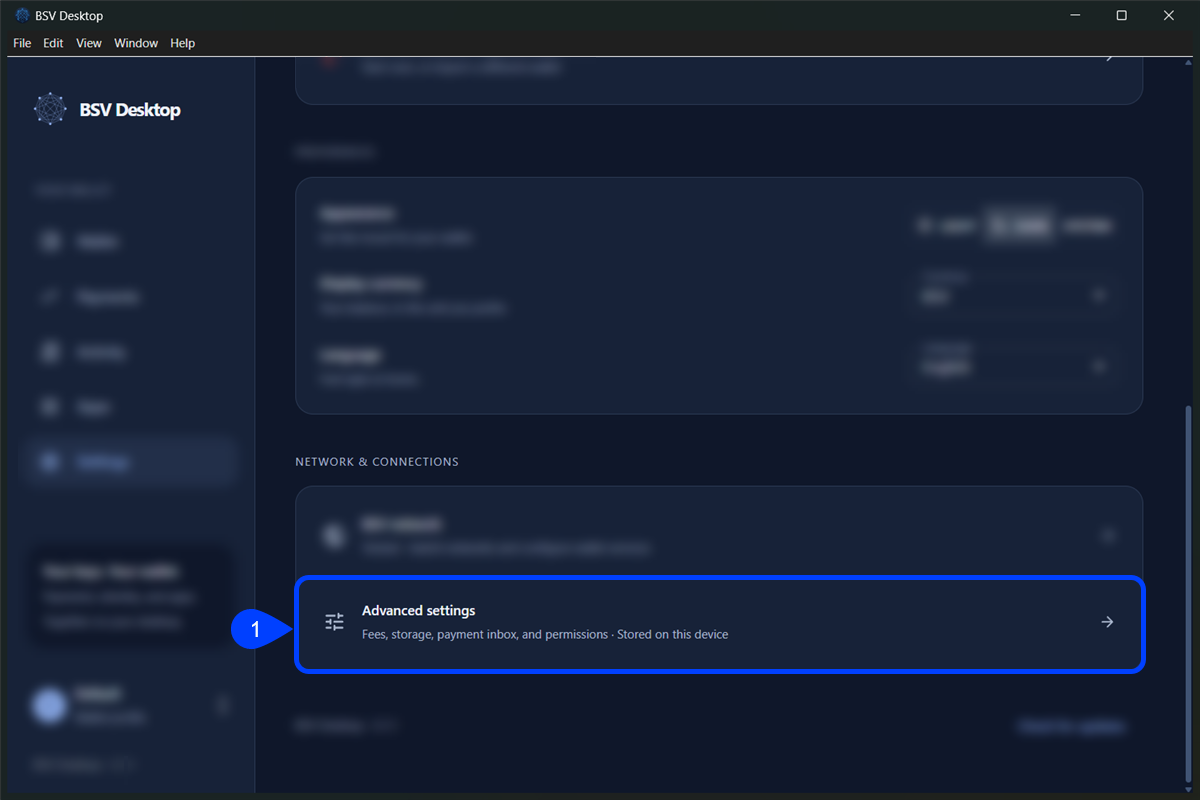
Open Settings, and under Network & connections click Advanced settings.
Turn off the spending permission
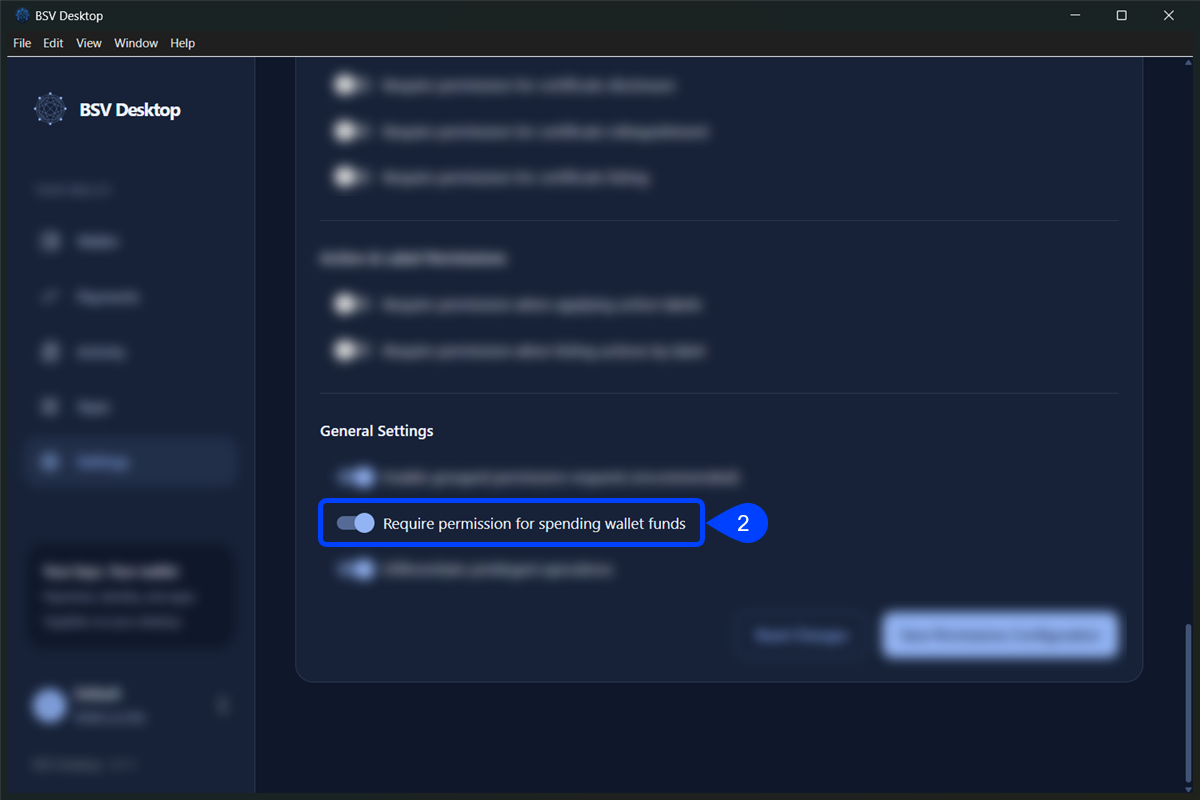
Scroll to Permissions Configuration, click Show Advanced Settings and turn off Require permission for spending wallet funds in General Settings. The toggle is on by default.
Save the configuration
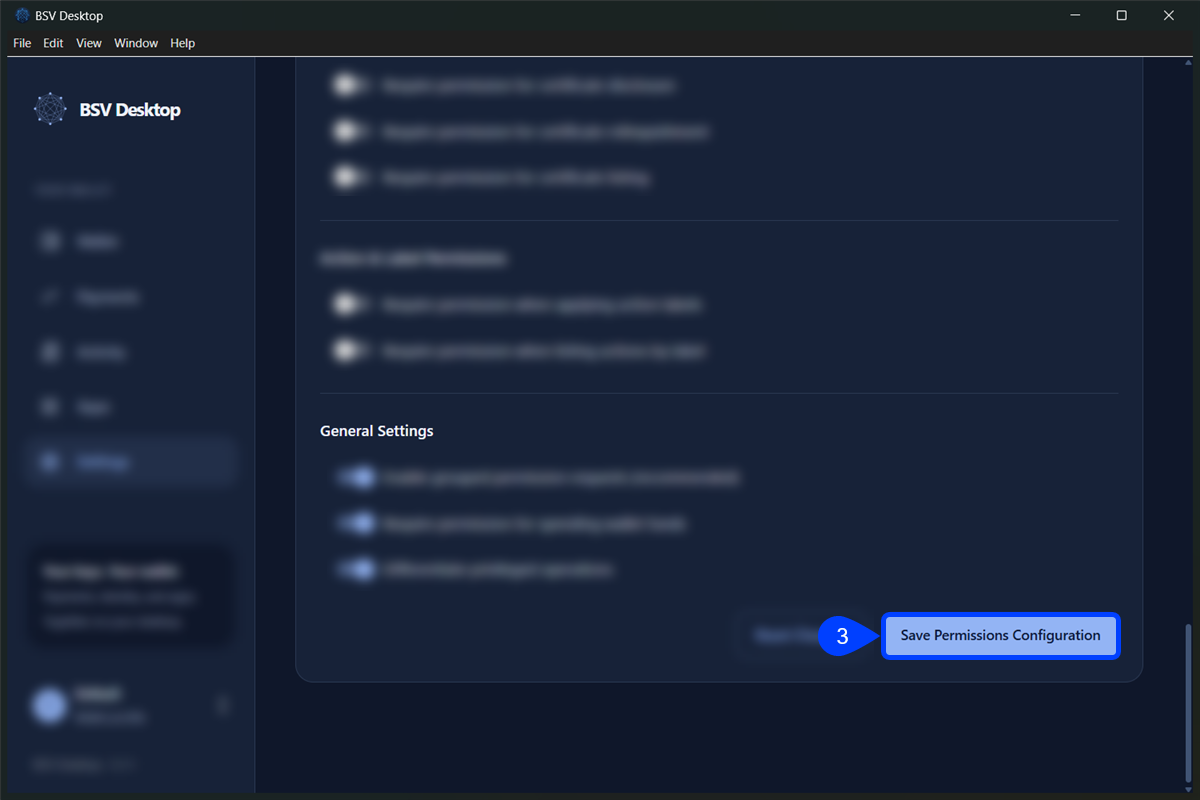
Click Save Permissions Configuration and reload the app.
Pay without the fetch wrapper
A client that cannot use create402Fetch, such as a service worker or another HTTP library, builds the payment headers itself. This example reads the price and the server key from the 402, builds the headers and sends the paid request. The fetch calls stand for the HTTP client you use, and the code goes inside an async function, like main in client.ts:
Read the price and the server key from the 402
After the unpaid request returns the 402, read the price and the server key from its headers in your client code:
const first = await fetch(url)
const satoshis = Number(first.headers.get('x-bsv-sats'))
const serverIdentityKey = first.headers.get('x-bsv-server')!x-bsv-sats holds the price in satoshis and x-bsv-server the identity key of the server wallet, the same two headers that the curl output showed.
Build the headers and repeat the request
Ask the wallet for the payment headers in the same file, then repeat the request with them:
import { WalletClient } from '@bsv/sdk'
import { constructPaymentHeaders } from '@bsv/402-pay/client'

const wallet = new WalletClient('auto', 'localhost:3000')
const headers = await constructPaymentHeaders(wallet, url, satoshis, serverIdentityKey)
const response = await fetch(url, { headers })constructPaymentHeaders asks the wallet for a payment of satoshis to an address derived from serverIdentityKey. The headers it returns go on the repeated request, and a 200 means the server accepted the payment.
constructPaymentHeaders returns five headers, and the client repeats the request with them:
| Header, as sent | What it holds |
|---|---|
x-bsv-beef: <base64 BEEF> | The payment transaction as base64 BEEFBackground Evaluation Extended Format (BRC-62) |
x-bsv-sender: <66 hex characters> | The identity public key of the client |
x-bsv-nonce: q83vEjRWeJA= | Base64 of 8 random bytes, the derivation prefix |
x-bsv-time: 1791979200000 | A Unix timestamp in milliseconds, which the server accepts within 30 seconds of its own clock |
x-bsv-vout: 0 | The index of the payment output |
Prepare the API for production
Before the API serves more than one process or leaves your machine, check these points:
-
Serve the API over HTTPS. The client sends the payment with
redirect: 'manual', so request the final HTTPS address instead of one that redirects. -
Share one replay store between processes. The server accepts each payment transaction once, and the default store lives in the memory of one process and holds 100,000 entries. With more than one process, pass
replayStore, an object whoseclaim(txid, expiresAt)method is atomic and shared:createPaymentMiddleware({ wallet, calculatePrice: () => 1000, replayStore }) -
Keep the clocks in sync with NTP, or change the window with
paymentWindowMs.
To adopt this in a real project, add createPaymentMiddleware to the routes you want to charge for in your own Express API, and keep SERVER_PRIVATE_KEY in your secret store and the SQLite file on storage that survives restarts.
Troubleshooting
Client cannot find BSV Desktop #
The client fails with No wallet available over any communication substrate. A Node script cannot connect to BSV Desktop without an originator, so pass one as the second argument of WalletClient, as in client.ts, and keep BSV Desktop open and unlocked.
Middleware rejects the wallet you passed #
The wallet option of createPaymentMiddleware takes a BRC-100BSV Request for Comments 100, the standard wallet interface for applications wallet, the object that Setup.createWalletSQLite returns in this guide. Any other object makes the server stop with A valid wallet instance is required. A ServerWallet from @bsv/simple is one of those objects, so pass serverWallet.getClient() for it.
Client gets a 402 again after paying #
The middleware of your server rejected the payment, and fetch402 returns that second 402 instead of throwing. The usual causes are a timestamp more than 30 seconds off the server clock, an output below the price, and a payment that was already used.
Server answers 503 with an empty body #
The middleware of your server answers this when the wallet or the replay store failed after the payment started, and it hides the error. To read it, wrap wallet.internalizeAction in a try and catch and log the error. The middleware sends no new 402 after a 503, so that the client does not pay twice, and the payment may already be credited to the wallet.
Client refuses to pay over plain http #
The client stops with Payment requests require HTTPS except on the local loopback interface. It sends a payment over http:// only to localhost, 127.0.0.1 and [::1], so serve the API over HTTPS and request that address.
Server crashes when started with ts-node #
If you start the server with ts-node instead of tsx, the crash shows Cannot read properties of undefined (reading 'fileExists'). ts-node 10.9.2 fails with TypeScript 7, the version that npm install -D typescript installs as of October 2026. Run the scripts with tsx, as in this guide.
Next steps
With the gated API running on testnet, continue with: