

Let users log in with any wallet
Build the login of your app around the wallet the user already has: a wallet on the same computer, such as BSV Desktop, or a wallet on their phone, such as BSV Browser, paired by QR code. At the end, a React (Vite) app with a small Express backend looks for a wallet when the user selects Log in, waits while that wallet is locked, offers the phone when there is none, and shows which wallet is connected with a way to change it. Use this for any app where users log in with a wallet instead of a password.
BRC-185BSV Request for Comments 185, Wallet Substrate Discovery, Selection, and Encrypted Mobile Connections is a proposed specification for how apps find, choose and connect to wallets, including phone wallets. It is a draft, last revised in October 2026, and no wallet or package implements all of it yet. This guide uses the packages available today and follows the login behavior of BRC-185 where they allow it. Gaps with BRC-185 lists what they cannot do yet.
Before you begin
You need Node.js 22.18 or newer, which runs TypeScript files directly, and a React project built with Vite and written in TypeScript. To try the computer path, open BSV Desktop on testnet. Send a payment from a web app shows how to set it up. This guide was tested with @bsv/wallet-relay 0.7.0, @bsv/sdk 3.2.1, Express 5 and Vite 8.
How the login decides
The login reacts to what it finds, in the order BRC-185 sets out:
| Situation | What the login does |
|---|---|
| The user selects Log in | Looks for a BRC-100BSV Request for Comments 100, the standard interface between apps and wallets wallet on this computer. It does not look before the user asks |
| A wallet answers and is unlocked | Logs in with it |
| A wallet answers and is locked | Waits, and asks the user to unlock it or approve the request. A locked wallet is not a missing one, so the login does not offer to install a wallet or switch to another one by itself. The user can still choose the phone |
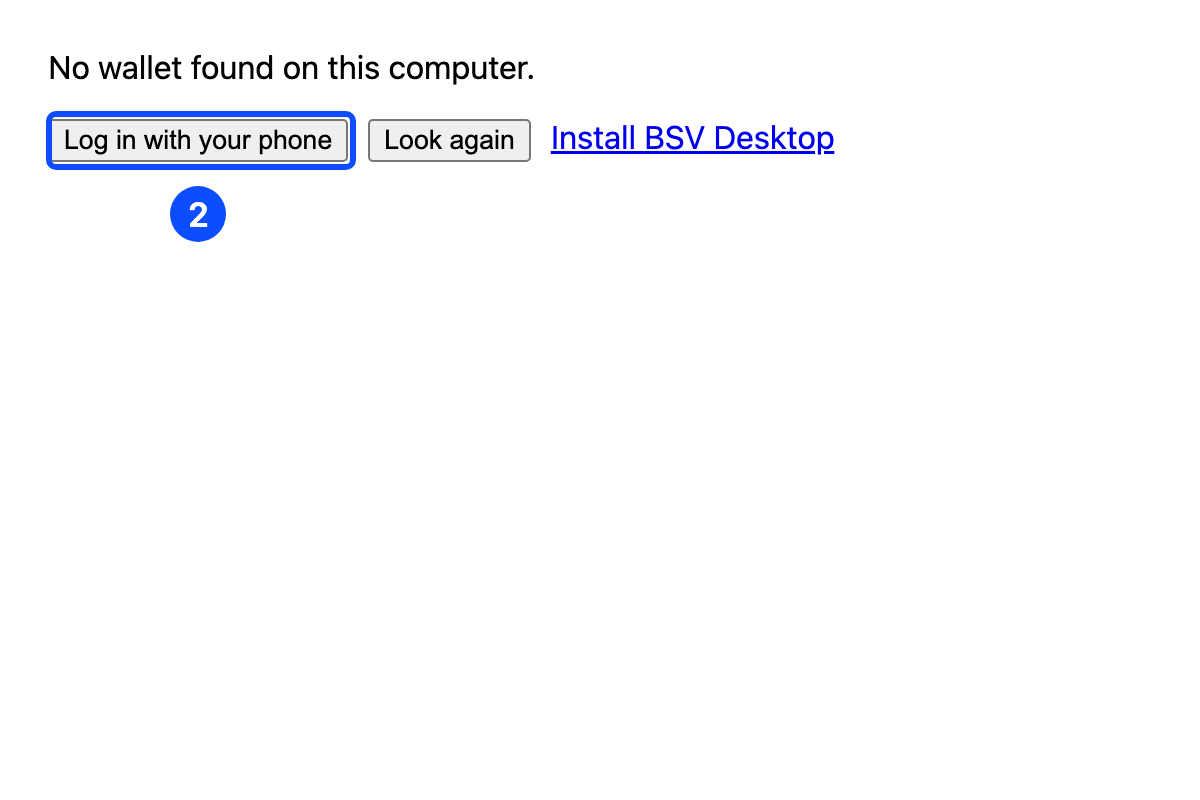
| No wallet answers | Says that no wallet was found on this computer, and offers the phone, another look and a link to install BSV Desktop |
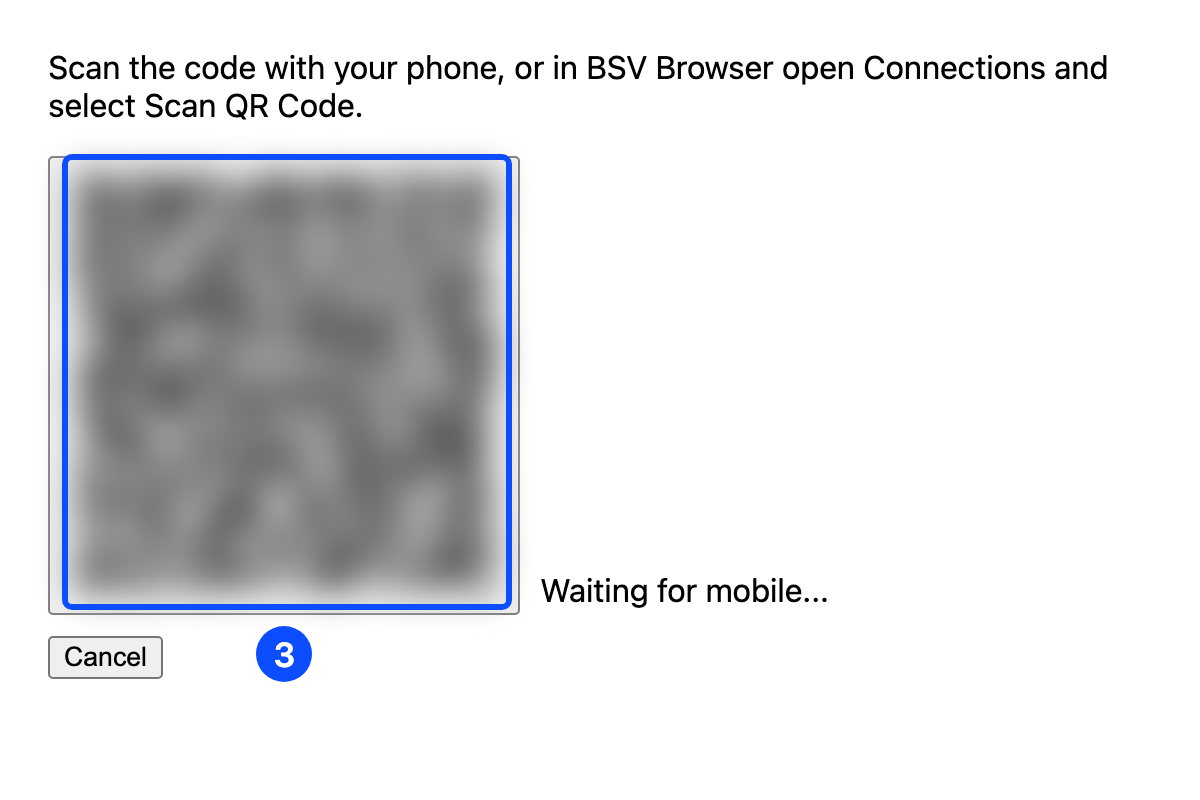
| The user chooses the phone | Shows a QR code. The user scans it with the phone and approves the connection there |
| The user is logged in | Shows which wallet is connected, with a control to change wallet or log out |
The identity key that the wallet returns tells the page who the user is. It does not prove it to your server: the page reads the key in the browser, and nothing checks that the caller holds the private key behind it, so any script or modified client can send any public key. To have your API know which user sent each request, add mutual authentication as in Authenticate users with their wallet.
How the phone connection works
Wallet RelayAn encrypted connection between a web app and a phone wallet, through a relay that cannot read the messages is the @bsv/wallet-relay package that pairs a web page with a phone wallet. Your backend creates a pairing session and a QR code. The phone scans the code, reads the session from your app over HTTPS, and exchanges encrypted messages with your backend through the relay. The page sends each wallet call to your backend, which passes it to the phone. The phone keeps the keys.
Your backend encrypts and decrypts the messages, so it can read every wallet call and result that goes to the phone. Only the relay in between sees nothing but encrypted messages. BRC-185 calls this backend mode and asks the app and the wallet to tell the user before they approve. BSV Browser 1.8.1 does not show that notice, so say it in your app, for example in your privacy notice.
The relay carries 16 wallet methods: getPublicKey, listOutputs, createAction, signAction, createSignature, verifySignature, listActions, internalizeAction, acquireCertificate, relinquishCertificate, listCertificates, revealCounterpartyKeyLinkage, createHmac, verifyHmac, encrypt and decrypt. getNetwork is not one of them, so a phone wallet cannot tell your app which network it is on.
Add the backend
The backend creates the pairing sessions and runs the relay. Run these steps in a new backend folder next to your React project:
Install the packages
Install the packages and set the folder to use ES modules:
npm install @bsv/wallet-relay @bsv/sdk express ws qrcode
npm install --save-dev @types/express @types/node
npm pkg set type=moduleCreate the relay key
The relay key is a private key. Keep it in .env and never commit it. It does not hold funds, but anyone who has it can act as your backend in a pairing.
The phone checks the identity key of your backend, which is in the QR code, so the backend must keep the same key across restarts. Add a key to .env. The command skips this if .env already has one, so running it again never replaces the key:
grep -q WALLET_PRIVATE_KEY .env 2>/dev/null || node --input-type=commonjs -e "const {PrivateKey}=require('@bsv/sdk'); console.log('WALLET_PRIVATE_KEY=' + PrivateKey.fromRandom().toHex())" >> .env
echo .env >> .gitignoreWrite the server
Create server.ts. WalletRelayService adds the session routes under /api and the relay at /ws to your Express app:
import { createServer } from 'node:http'
import express from 'express'
import { PrivateKey, ProtoWallet } from '@bsv/sdk'
import { WalletRelayService } from '@bsv/wallet-relay'

const app = express()
app.use(express.json({ limit: '64kb' }))
const server = createServer(app)

const wallet = new ProtoWallet(PrivateKey.fromHex(process.env.WALLET_PRIVATE_KEY!))
new WalletRelayService({ app, server, wallet })

server.listen(3000, () => console.log('Wallet Relay backend on http://localhost:3000'))ProtoWallet encrypts and decrypts the relay messages with the relay key. It is not the user’s wallet and holds no funds.
Start the server
Start the server from the backend folder:
node --env-file=.env server.tsThe server prints its address:
Wallet Relay backend on http://localhost:3000Add the login to your app
The login component holds the decisions from the table above. Run these steps in your React project:
Install the packages
Install the packages in your React project:
npm install @bsv/wallet-relay @bsv/sdkSend the API calls to the backend
In vite.config.ts, forward /api and the relay at /ws to the backend, so the page and the backend share one origin:
import { defineConfig } from 'vite'
import react from '@vitejs/plugin-react'

export default defineConfig({
  plugins: [react()],
  server: {
    proxy: {
      '/api': 'http://localhost:3000',
      '/ws': { target: 'ws://localhost:3000', ws: true }
    }
  }
})Create the login component
Create src/Login.tsx:
import { useEffect, useRef, useState } from 'react'
import { WalletClient, type WalletInterface } from '@bsv/sdk'
import type { WalletMethodName } from '@bsv/wallet-relay/client'
import { QRDisplay, useWalletRelayClient } from '@bsv/wallet-relay/react'

export type AppWallet = Pick<WalletInterface, WalletMethodName>

export type User = {
  wallet: AppWallet
  identityKey: string
  via: 'this computer' | 'your phone'
  logOut: () => void
}

type Status = 'start' | 'looking' | 'waiting' | 'none' | 'pairing'

export function Login({ onLogin }: { onLogin: (user: User) => void }) {
  const [status, setStatus] = useState<Status>('start')
  const [message, setMessage] = useState('')
  const relay = useWalletRelayClient({ autoCreate: false })
  const attempt = useRef(0)

  async function findComputerWallet() {
    const thisAttempt = ++attempt.current
    const stillCurrent = () => attempt.current === thisAttempt
    setMessage('')
    setStatus('looking')
    const local = new WalletClient('auto')
    try {
      await local.connectToSubstrate()
    } catch {
      if (stillCurrent()) setStatus('none')
      return
    }
    if (!stillCurrent()) return
    setStatus('waiting')
    try {
      await local.waitForAuthentication()
      const { publicKey } = await local.getPublicKey({ identityKey: true })
      if (stillCurrent()) onLogin({ wallet: local, identityKey: publicKey, via: 'this computer', logOut: () => {} })
    } catch (e) {
      if (!stillCurrent()) return
      setMessage(`The wallet did not log you in: ${String(e)}`)
      setStatus('none')
    }
  }

  function startPhoneLogin() {
    attempt.current++
    setMessage('')
    setStatus('pairing')
    void relay.createSession()
  }

  function cancelPhoneLogin() {
    relay.cancelSession()
    setStatus('none')
  }

  useEffect(() => {
    if (relay.session?.status !== 'connected' || !relay.wallet) return
    const phone = relay.wallet
    phone
      .getPublicKey({ identityKey: true })
      .then(({ publicKey }) =>
        onLogin({ wallet: phone, identityKey: publicKey, via: 'your phone', logOut: relay.cancelSession })
      )
      .catch(e => setMessage(`Your phone did not log you in: ${String(e)}`))
  }, [relay.session?.status, relay.wallet, relay.cancelSession, onLogin])

  return (
    <div>
      {(message || relay.error) && <p>{message || relay.error}</p>}
      {status === 'start' && <button onClick={() => void findComputerWallet()}>Log in</button>}
      {status === 'looking' && <p>Looking for a wallet on this computer…</p>}
      {status === 'waiting' && (
        <>
          <p>Wallet found. Unlock it, or approve the request in the wallet.</p>
          <button onClick={startPhoneLogin}>Use your phone instead</button>
        </>
      )}
      {status === 'none' && (
        <>
          {!message && <p>No wallet found on this computer.</p>}
          <button onClick={startPhoneLogin}>Log in with your phone</button>
          <button onClick={() => void findComputerWallet()}>Look again</button>
          <a href="https://desktop.bsvb.tech" target="_blank" rel="noreferrer">Install BSV Desktop</a>
        </>
      )}
      {status === 'pairing' && (
        <>
          <p>Scan the code with your phone, or in BSV Browser open Connections and select Scan QR Code.</p>
          <QRDisplay session={relay.session} onRefresh={relay.createSession} />
          <button onClick={cancelPhoneLogin}>Cancel</button>
        </>
      )}
    </div>
  )
}connectToSubstrate looks for a wallet on this computer and fails if none answers. waitForAuthentication then waits until the wallet is unlocked, which is the waiting state. If the user chooses the phone while the wallet is still locked, attempt makes the computer path stop, so unlocking the wallet later does not log the user in with it or take away the QR code. On the phone path, autoCreate: false creates a backend session only when the user chooses the phone, and cancelSession ends it and closes the connection to the phone. When the phone approves, relay.wallet stops being null and forwards each call to the phone.
Show the login
Replace src/App.tsx so it shows the login until the user is logged in, and then which wallet is connected:
import { useState } from 'react'
import { Login, type User } from './Login'

export default function App() {
  const [user, setUser] = useState<User | null>(null)

  function logOut() {
    user?.logOut()
    setUser(null)
  }

  if (!user) return <Login onLogin={setUser} />

  return (
    <div>
      <p>Logged in with the wallet on {user.via} as {user.identityKey}</p>
      <button onClick={logOut}>Change wallet or log out</button>
    </div>
  )
}Keep user.wallet for the rest of your app. It has the same methods whether the wallet is on the computer or the phone.
user.identityKey identifies the user inside the page only. Do not send it to your API as proof of who the user is, because a client can send another user’s key. Before your server trusts a key for data or actions, verify it with mutual authentication, as in Authenticate users with their wallet.
Try the computer path
Start the app with npm run dev, open http://localhost:5173 and select Log in. With BSV Desktop open and unlocked, the page shows the identity key of the wallet, shortened here:
Logged in with the wallet on this computer as 023f…b5abLog in with a phone
A phone wallet connects only to an app served over HTTPS, so the phone path needs a public address. Point an HTTPS development tunnel at port 5173, add its domain to server.allowedHosts in vite.config.ts, and add two lines to the .env of the backend, below WALLET_PRIVATE_KEY:
RELAY_URL=wss://YOUR_DOMAIN
ORIGIN=https://YOUR_DOMAINReplace YOUR_DOMAIN with the domain of the tunnel. ORIGIN is the address that the QR code points the phone to, and the phone adds /ws to RELAY_URL to reach the relay through the Vite proxy. Restart the backend after you change them.
Then log in from the phone:
Put BSV Browser on testnet
In BSV Browser, open Wallet, Settings, BSV Network and choose Testnet. The relay does not carry getNetwork, so your app cannot check which network the phone wallet is on. Check it yourself before you log in.
Open the phone login
Close BSV Desktop, open the app at https://YOUR_DOMAIN, select Log in, and then select Log in with your phone.
Scan the QR code
The page shows a QR code and Waiting for mobile.... Scan it with the camera of the phone. You can also scan it from inside BSV Browser: open the menu with the three dots at the bottom right, select the link icon next to Wallet to open Connections, and select Scan QR Code.
Approve the connection
BSV Browser opens on Connect Wallet and shows the address of your app under Origin. Check that it is the app you opened, then select Approve. The page shows the identity key of the phone wallet. The connection then appears in Connections in BSV Browser, where the user can disconnect it.
The QR code is a short-lived invitation, and the first wallet to scan it pairs with the page. Do not show it in a screen share or save it in a log.
Gaps with BRC-185
Today’s packages predate BRC-185, so this login cannot yet do everything the specification asks:
- One wallet on the computer.
WalletClienttries a fixed set of local ports and uses the first wallet that answers. It cannot list several wallets on one computer or let the user choose between them - No wallet name or remembered choice. The login cannot tell which wallet product answered, so it says “the wallet on this computer”, and it looks again at every login
- Blocked looks like absent. If the browser blocks access to local ports, the login reports that no wallet was found. Look again lets the user retry after allowing access
- No confirmation code. BRC-185 has the app and the phone show the same code for the user to compare. With Wallet Relay the user checks the origin only
- The backend reads the calls. BRC-185 prefers pairing where only the page can decrypt. Wallet Relay decrypts on your backend, as the warning above explains
- Part of the wallet interface. The relay carries 16 methods. BRC-185 requires all 28 BRC-100 methods
Troubleshooting
Server fails with Cannot use import statement outside a module #
The backend folder is not set to ES modules. Run npm pkg set type=module in it and start the server again.
Phone rejects the QR code #
BSV Browser connects only to an app served over HTTPS. Check that ORIGIN starts with https:// and RELAY_URL with wss://, and that you opened the app at that address.
Related articles
- Authenticate users with their wallet
- Integrate the BSV blockchain with web frameworks
- BSV Browser
- BRC-185 specification
- The
@bsv/wallet-relaypackage on GitHub